

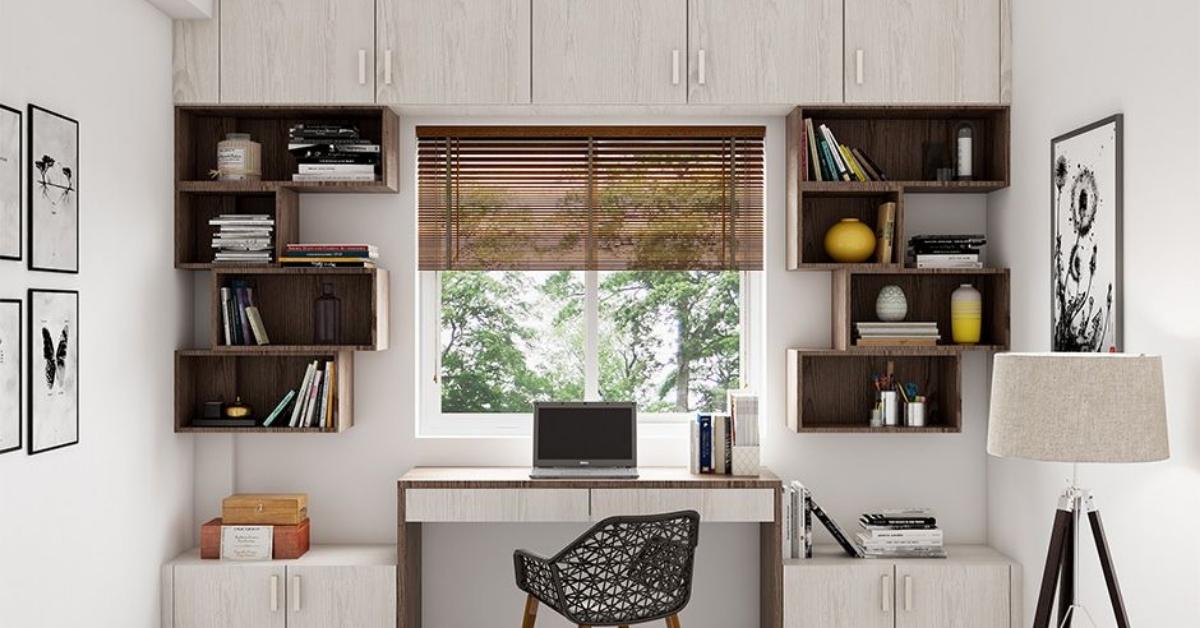
A cluttered desk doesn’t just look messy, it actively slows you down. When your workspace is disorganized, you spend mental energy managing the chaos instead of doing the work. Home Office Organization Ideas Whether you’re dealing with a dedicated room, a compact corner setup, or a shared living space that moonlights as your office, the right organization system can change how productive and calm that space actually feels.
This is especially relevant now in 2026, more people are designing permanent home offices rather than temporary ones, and the shift has changed what “organized” really means. It’s less about hiding everything behind matching boxes and more about creating a system that’s genuinely usable day-to-day. If you’re working with a small room, a rented apartment, or a multi-use space, these ideas are built with real constraints in mind.
Float Your Desk Against the Wall to Create Usable Floor Space

A wall-mounted desk with no legs beneath it does something a standard desk can’t: it gives you floor space back. In a small home office, especially one under 10×10 feet, a floating surface at the right height eliminates the visual weight of furniture legs and makes the room feel roomier than it is. Pair it with a sleek task light mounted directly to the wall above, and you’ve also removed desk lamp clutter from the surface entirely. This setup works especially well in rental apartments where space is fixed and furniture needs to pull double duty. The main problem it solves is the “cramped corner” issue when a standard desk pushes too far into the room and breaks the walking flow.
Use a Pegboard Wall Panel to Keep Frequently Used Tools Within Reach
Pegboards have been around forever, but when they’re installed directly above the workspace flush against the wall rather than off to the side they function like a vertical desktop. Everything that used to pile up on the surface (scissors, chargers, sticky notes, headphones) gets a hook or a bin, and the desk itself stays clear. The key is to mount it at eye level and keep it organized in visual zones: left side for frequently used items, right side for reference materials. This layout works best for anyone who needs physical tools nearby graphic designers, writers, crafters, or anyone who actually prints things. In my experience, this works best when you limit each hook to one item the moment pegboards become catch-alls, they become a second form of clutter.
Install Tall Open Shelving on One Side Wall to Store Without Squeezing the Room

The instinct in a small office is to go wide with shelving but going tall on one wall instead of multiple walls keeps more of the room open and maintains sightlines across the space. A single run of floor-to-ceiling shelves (or close to it) on one wall acts as a visual anchor rather than a visual wall. Use the top shelves for things you rarely access, middle shelves for current projects and books, and the lowest shelves for storage boxes. This approach works particularly well in narrow rooms where putting shelving on two walls would make the space feel tunnel-like. It solves the common problem of having too much to store and not enough flat surfaces to put it on.
Read More About : 23 Aesthetic Home Office Ideas That Actually Make You Want to Sit Down and Work
Cable Management With a Desk Grommet and Under-Desk Tray Keeps Your Surface Clear
Cables are the fastest way to make an otherwise organized desk look chaotic. A desk grommets a simple hole with a cover plate that lets you route all power and data cables down through the surface and into an under-desk cable tray, where they’re bundled and completely out of sight. The visual effect is significant: the same desk setup looks like two different rooms when the cables are hidden versus coiled across the surface. This is one of the lowest-cost, highest-impact changes you can make to a home office setup. It’s also renter-friendly if you’re using a grommet that clips onto an existing desk rather than requiring you to drill. Best for: multi-monitor setups, standing desks, or anywhere cables tend to multiply quickly.
A Rolling Cabinet Under the Desk Doubles Storage Without Taking Floor Space

If your desk has clearance underneath, a rolling pedestal cabinet turns that dead zone into active storage. Unlike a fixed cabinet, a rolling version can be pulled out when you need it and tucked back under the desk when you don’t, so it doesn’t change the room’s footprint visually or physically. File drawers work well for documents, but many people use them for supplies, tech accessories, or anything else that doesn’t need to live on a surface. This is a particularly useful solution for home offices without any built-in storage. It solves two things at once: adds significant capacity without occupying additional square footage, and removes the pressure to store everything on shelves.
A Dedicated “Inbox Zone” on Your Desk Stops Paper From Taking Over
Without a specific landing spot for incoming papers, they pile up wherever there’s space which is usually the middle of the desk. A single letter tray or document holder in one defined corner changes the behavior: instead of spreading, paper accumulates in one spot and stays there. The tray itself doesn’t need to be large; a single A4-width tray that holds 20–30 sheets is enough if you process it regularly. The spatial impact is significant because it contains what would otherwise be a creeping mess. This works in any home office setup, but it’s especially useful if your work involves physical documents, invoices, contracts, printed reference materials. The rule is simple: anything that lands on your desk goes into the tray, not onto the surface.
Use Drawer Dividers to Stop the “Everything Drawer” Problem

Most desk drawers become a catch-all within a few weeks. The fix isn’t a bigger drawer, it’s structure inside the existing one. Bamboo or acrylic drawer dividers (available at low cost and easy to cut to size) create distinct zones for different item types, so things actually go back where they belong. Pens together, charging cables in their own slot, paper clips and small accessories separated from each other. The practical result: you stop excavating your drawer every time you need something. This solves a usability problem, not just an aesthetic one. In my experience, this tends to have a longer-lasting effect than shelf organization because drawers are where things go to disappear. A little structure makes the system self-correcting.
Mount Your Monitor on an Arm to Free Up Desk Real Estate
A monitor arm does something a standard stand can’t: it lifts the screen up and back, returning the space underneath to a usable desk surface. Depending on your monitor size, that’s anywhere from a dinner plate to a small chopping board worth of surface area you get back. More practically, a monitor arm lets you adjust height and distance on the fly, which matters for ergonomics during long work sessions. This is especially useful for smaller desks or setups where a second monitor is involved. The problem it solves is the “my desk is too small” feeling. Often the desk is a reasonable size, but the monitor stand is eating too much of it.
Hang a Corkboard or Magnetic Panel for Reference Materials You Actually Need to See

Reference materials that live in drawers or folders get referenced less the friction of opening and finding is just high enough to make people skip it. A corkboard or magnetic wall panel at eye level, positioned just to the side of the monitor, keeps current project notes, deadlines, or reference cards visible without occupying desk space. The key word is “current” this panel should only hold what’s actively relevant. When a project ends, the pins come down. Honestly, this is one of those setups that gets messy fast if you don’t maintain it, but when it’s curated, it’s one of the most functional parts of a home office. Works best in roles that involve project tracking, ongoing references, or anything deadline-driven.
Set Up a Dedicated Tech Charging Station Away From the Work Surface
When phones, tablets, earbuds, and watches charge directly on the desk, they compete for surface space and create ambient visual clutter. Moving all charging to a single side station, a small shelf, a side table, or even a wall-mounted organizer removes that category of clutter entirely from the main workspace. Charging happens in one dedicated spot, and the desk surface remains clear for actual work. This also solves a behavior problem: when your phone charges at your desk, you’re more likely to pick it up constantly. A side station creates a small physical distance that’s often enough to reduce that habit. Works especially well in dedicated home offices where distraction management matters.
Use Vertical File Folders on Your Desk for Active Projects Only

Flat file stacks collapse into piles. Vertical file holders keep documents upright, labeled, and accessible without the mess. The key constraint is keeping only active projects in them; if a project is finished, the files go into storage, not into a growing collection of vertical holders. Two to three holders is typically the maximum before the system becomes cluttered. They’re best positioned at the back edge of the desk or to one side where they’re reachable but not in the main work zone. For anyone who manages physical documents regularly, project managers, freelancers, people in administrative roles, this is one of the most functional desk additions available at a low cost.
Read More About : 27 Low Budget Home Office Setup Ideas That Actually Make Working From Home Feel Good
Install Under-Shelf Lighting to Improve Task Visibility Without Desk Lamps
Poor lighting in a home office creates eye strain and changes how the entire space feels even if a well-organized room looks dim and uninviting under insufficient light. LED strip lights mounted to the underside of a shelf above the desk provide direct task lighting without occupying desk space or adding another cord to manage on the surface. The warm-to-neutral color temperature (around 3000–4000K) is the right range for focused work. Cool white can feel clinical, warm white too dim for reading. This is a particularly good option in rooms where the overhead light source is positioned behind the desk, which creates shadows on the work surface. Low cost, easy to install with adhesive backing, and noticeable in a genuinely functional way.
Add a Small Whiteboard Panel for Daily Planning Without Paper Waste

A dedicated planning surface that can be erased daily removes the accumulation of sticky notes and paper to-do lists from the desk. Even a small magnetic whiteboard 30 by 40 centimeters is enough space for a daily task list, a priority note, or a quick schedule. Mounted beside the monitor or on the wall to the side of the desk, it stays visible without interrupting the workspace. This is a better alternative to sticky notes for people who tend to cover their monitors or desk edges with them. It also solves the problem of digital task apps being a distraction: a physical list is visible without opening a screen or an app.
Label Everything in Storage Boxes to Make Your System Actually Stick
An unlabeled storage box is just a mystery container. When you can’t see what’s inside, you stop using the system. Things pile up outside the boxes because putting them away requires remembering or guessing what goes where. Labeled boxes, even with simple adhesive labels or a label maker, make the system self-explanatory and maintainable without effort. For home offices that use identical boxes for a cleaner visual appearance, labeling is especially important. The categories should be broad enough to hold multiple items but specific enough to be distinct “Tech Accessories,” “Documents,” “Office Supplies” rather than one large “Miscellaneous.”
Create a Separate Storage Area for Non-Work Items That End Up in the Office

In a dedicated home office, the room gradually collects non-work items, charging cables for devices you don’t use at the desk, books you were reading elsewhere, household items that were placed there temporarily. Over time, this bleed creates ambient clutter that undermines the whole organization system. A single closed container, a small cabinet, a lidded bin, or a basket designated specifically for “things that don’t belong here but need a temporary home” contains the drift without letting it spread. The rule: the container empties weekly, and nothing in it gets used at the desk. It solves the real-world problem of maintaining a system in a home environment where the boundaries between spaces are naturally more fluid.
Use an Ergonomic Desk Organizer That Separates Function Zones on the Surface
A modular desk organizer of the kind with multiple compartments of different sizes brings structure to the desk surface without requiring you to clear it constantly. Each compartment has an assigned purpose: pens in one slot, phone upright in another, a small notepad in a third. When everything has a specific place, the desk resets quickly and stays organized between sessions without requiring active maintenance. The best versions are horizontal rather than tower-style, because they keep the visual sightline across the desk open. This is especially useful in compact setups where there’s limited surface area and every item needs to earn its place.
Designate One Day a Week to Reset the Entire Office System

Organization systems don’t maintain themselves; they degrade slowly and then suddenly. A scheduled weekly reset (even 15–20 minutes) prevents the slow accumulation that leads to full disorganization. During the reset: clear the desk surface completely, process the inbox tray, return items to their storage zones, and empty anything temporary. The point isn’t perfection, it’s a reliable recovery cycle so the system never falls too far. In environments where the home office is also a shared space, a weekly reset also re-establishes the boundary between work territory and household space. This is less of a setup idea and more of a behavioral system, but in practice, it’s what determines whether any physical organization strategy actually holds over time.
What Actually Makes These Ideas Work
The ideas above span a range of approaches: furniture placement, storage systems, surface management, and habits and what ties them together is a simple principle: organization that requires active effort to maintain doesn’t last.
The most effective home office setups are built around friction reduction. When something is easy to put away, it gets put away. When a system requires minimal decision-making labeled boxes, defined zones, a single inbox it gets used consistently without conscious effort.
A few practical notes worth understanding before you implement anything:
Start with surface management, not storage.
The desk surface is where your focus happens. Before adding more shelving or bins, reduce what lives on the desk to only the essentials. Many organization problems are actually surface-management problems in disguise.
Dedicated spaces only work if they’re used consistently.
A charging station, a cable tray, an inbox tray all of these require a small behavior change to activate. Give any new system 2–3 weeks before evaluating whether it’s working. Most organizational habits take a few weeks to become automatic.
Scale the system to the room.
A small office with minimal storage needs a different approach than a large dedicated room with built-in shelving. Resist the urge to implement every idea at once, start with the two or three that address your most frequent frustrations.
Home Office Organization Ideas: Quick Comparison Guide
| Idea | Best Space Typ | Problem Solved | Difficulty | Budget Level |
| Floating desk | Small rooms, rentals | Poor floor space | Low | Low–Medium |
| Pegboard wall panel | Compact desks | Surface clutter | Low | Low |
| Tall open shelving | Narrow rooms | Limited storage | Medium | Medium |
| Cable grommet + tray | Multi-monitor setups | Cable mess | Low | Low |
| Rolling cabinet | Desks with underspace | Hidden storage | Low | Medium |
| Monitor arm | Small desks | Lost desk real estate | Low | Medium |
| Under-shelf LED lighting | Rooms with poor overhead light | Eye strain, shadows | Low | Low |
| Charging station | Any office | Device clutter on desk | Low | Low |
| Weekly reset habit | Any setup | System degradation | Low | Free |
Common Home Office Organization Mistakes That Make Your Space Feel Cluttered
Buying storage before auditing what you actually have.
Most people add bins and boxes before removing what doesn’t belong. The result is neatly stored clutter. Before organizing, spend 20 minutes removing everything that doesn’t serve a work function in that room. What’s left will be far easier to organize.
Treating all surfaces the same.
The desk surface should be treated differently from shelves, from floors, from windowsills. The desk is your active zone; only items used daily belong there. Shelves are medium-frequency storage. Anything else should have a dedicated drawer or closed container. When all surfaces hold all types of things, nothing has a place.
Ignoring the visual midline.
In most home offices, the area at eye level when seated roughly the monitor height to 20 centimeters above is where attention lands most often. If this visual midline is cluttered, the room will always feel disorganized even if the rest is tidy. Keep this zone clear or minimally curated.
Under-lighting the task area.
Insufficient lighting creates the feeling of a space being heavier and smaller than it is. If your overhead light is behind you or far from the desk, the shadow it casts on your work surface makes the setup feel oppressive. Add under-shelf lighting or a properly positioned task light before changing anything else.
Over-organizing infrequently used items.
Spending significant time and money creating a precise system for items you use twice a year means that energy isn’t going toward the items you use every day. Prioritize organizing things by frequency of use; high-frequency items get the most accessible, most organized storage; low-frequency items just need a consistent location.
FAQ’s
What’s the most effective first step for organizing a home office?
Clear the desk surface completely and only put back what you use every day. A clutter-free desk makes every other organization system easier to implement and maintain. It’s the highest-impact change you can make before buying anything.
How do I organize a home office in a small room or apartment?
Focus on vertical storage (tall shelving, wall-mounted pegboards, floating desks) to preserve floor space, and use closed storage (drawers, cabinets) rather than open shelving for items you don’t need to see daily. Limiting what enters the space is more effective than adding more storage.
Is a pegboard worth installing in a home office?
Yes, if you use physical tools or accessories regularly: chargers, headsets, scissors, pens. It keeps frequently needed items within reach without occupying desk space. It works less well as general storage because it becomes visually busy quickly.
Floating desk vs. standard desk: which works better for small spaces?
A floating desk is better for rooms under 10×10 feet because it eliminates leg bulk and returns floor space. A standard desk offers more surface depth and sturdiness, which is preferable for larger setups or anyone who needs monitor arms, multiple screens, or significant desk real estate.
How do I keep a home office organized when it’s also used as a guest room or shared space?
Use closed, mobile storage rolling cabinets, lidded baskets that can be moved or cleared quickly when the room’s function changes. A defined “work zone” within the room (even just the desk area) helps maintain organization without requiring the entire room to be work-only.
What’s the best way to manage cables in a home office?
A desk grommet combined with an under-desk cable management tray handles most of the problem. Velcro cable ties (not zip ties, which are hard to remove) bundle individual cables, and labeled tags at the end of each cable make unplugging and reconfiguring faster.
How often should I reorganize my home office?
A 15–20 minute weekly reset to return items to their places is more effective than occasional full reorganizations. Major reorganizations (changing systems, clearing storage) are worthwhile every 3–6 months as your work needs to shift.
Conclusion
A well-organized home office doesn’t require a room makeover or a significant budget; it requires a clear system that fits how you actually work. The ideas here range from simple surface management to structural furniture changes, and most can be implemented incrementally. Small consistent adjustments, a cable tray here, a labeled shelf there tend to be more durable than full reorganizations done in a single weekend.
Start with whatever is causing the most friction right now. If your desk surface is the problem, start there. If cables are the issue, address that first. Pick one or two ideas from this list that fit your space and your work style, and give them a few weeks before evaluating. The best organization system is the one that doesn’t require you to think about it.
