

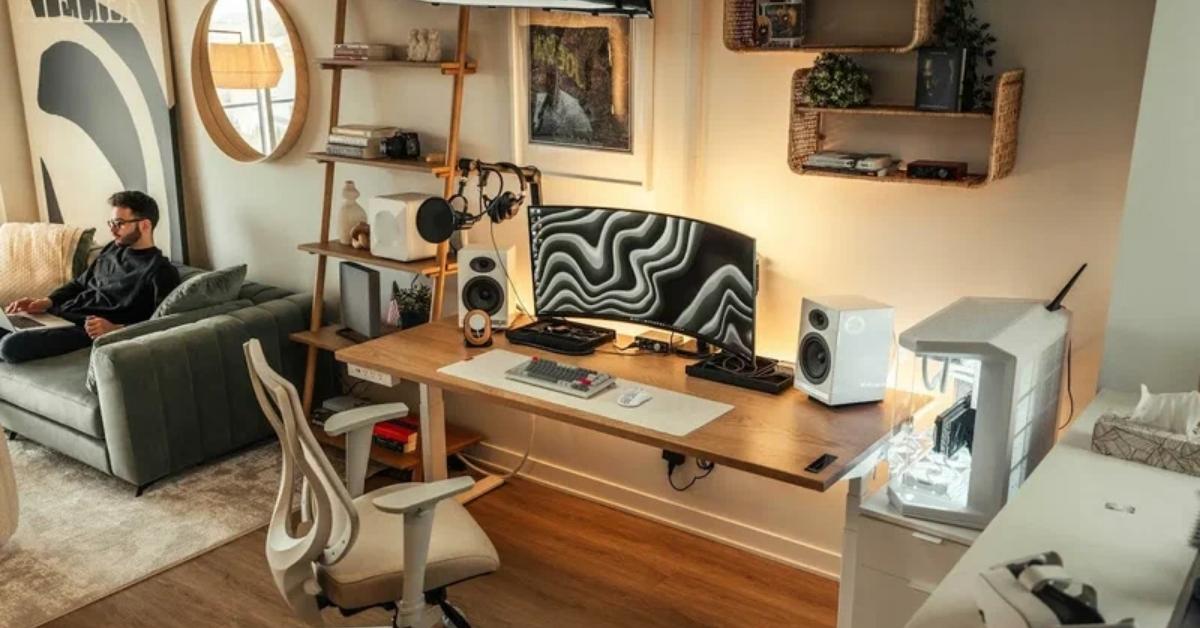
If your home office feels like a corner you reluctantly added to your bedroom a laptop balanced on a nightstand, cables running everywhere, no real separation between work and rest, you’re not alone. Most people underestimate how much their physical environment affects focus, energy, and the ability to actually close out at the end of the day.
Work from home setup ideas don’t have to mean a dedicated room or expensive furniture. The right combination of layout, lighting, and a few intentional choices can create a space that signals “work mode” without taking over your home. In 2026, the shift toward multi-functional spaces has made this even more relevant. People aren’t designing offices, they’re designing zones.
If you’re working with a small apartment, a shared bedroom, or a budget that doesn’t stretch to a full renovation, these ideas are built for that reality.
The Floating Shelf Desk: A Full Workstation That Disappears When You Need It To

The problem with most small-space work setups is that the desk takes over the room permanently. A floating wall-mounted shelf about 24 inches deep and 48 inches wide gives you a real working surface without the footprint. Add a sleek stool that tucks fully underneath, and the whole setup collapses into something that reads more like a console table than an office.
This works especially well in studio apartments where living and sleeping happen in the same room. The shelf height keeps things at proper ergonomic level (around 28–30 inches) without eating floor space. Positioning it near a window for natural light rather than overhead lighting dramatically reduces eye strain during long sessions. I’ve noticed this style works best when the shelf is painted the same color as the wall; it visually disappears and the room stays cohesive.
Alcove Office Setup: Turning a Dead Corner Into a Defined Work Zone
Alcoves are one of the most underutilized spaces in apartments and older homes. That awkward nook next to a chimney breast, or the recessed space beside a built-in wardrobe, is essentially a ready-made office shell; you just need to activate it. A simple cut-to-fit countertop (IKEA’s butcher block, for example) can bridge the space, and open shelves mounted above complete the built-in look for a fraction of the cost.
What makes this particularly effective is the contained feeling. Unlike an open-plan setup where visual clutter from the rest of the room competes for attention, an alcove creates natural peripheral boundaries. You face the wall, the space narrows your field of view, and focus comes more naturally. A warm-toned task lamp, not a bright overhead light keeps the zone distinct and easy on the eyes during late calls.
Bedroom Desk Behind the Headboard: Separating Spaces Without a Wall

One of the trickiest challenges in a studio or one-bedroom apartment is keeping work and sleep visually separated. Placing a narrow desk (about 18–20 inches deep) directly behind the headboard creates an invisible boundary when you’re in bed, the desk is behind you and out of sight. When you sit at the desk, you’re facing away from the bed entirely.
This layout works best with a low-profile platform bed rather than a bulky frame, so the desk surface can sit at a similar height and the two pieces read as one horizontal line across the room. Keep the desk surface minimal laptop, one external monitor, a small organizer so it doesn’t visually spill back into the sleeping zone. The key is containment over convenience.
Window-Facing Minimal Desk: Natural Light as Your Primary Work Tool
Positioning your desk so you face a window rather than having a window behind you is one of the highest-impact layout changes you can make. Light from the front reduces eye strain and eliminates screen glare, two things that quietly compound into afternoon fatigue if left unaddressed.
The setup itself can stay extremely minimal: a clean desk surface, one monitor or laptop stand at eye level, and a lamp for overcast days or evening use. Sheer curtains rather than blackout panels keep the light diffused without blocking it completely. Honestly, this single change in light source direction makes more difference to daily focus and energy than almost any furniture upgrade.
Gallery Wall Plus Corkboard: A Work Background That’s Both Functional and Polished

Video calls have made the visual background of your desk an actual functional requirement. A curated gallery wall framing a mix of prints, a corkboard panel, and a small floating shelf creates a backdrop that reads as organized and considered rather than generic. Practically, the corkboard replaces loose sticky notes scattered across your desk surface, and the framed pieces add visual interest without requiring any shelving.
The trick is treating the wall behind your desk as a design zone, not an afterthought. Keep frames in two or three metal or wood tones for cohesion. Use the corkboard to hold active to-dos and the shelf for a single plant or object. The result is a background that looks deliberate on camera and stays useful off it.
Standing Desk Converter on a Regular Dining Table: Ergonomic Without Replacing Your Furniture
If you don’t have a dedicated office space and work at the dining table, a standing desk converter gives you height flexibility without replacing the table itself. These platforms sit on top of existing surfaces and raise your monitor and keyboard to standing height then lower flat when you’re done. They range from $60 budget options to more solid pneumatic versions around $200.
This setup is particularly practical for people who move between rooms during the day or need the dining table for meals. The converter folds down to less than 4 inches in height, so it doesn’t interfere when not in use. Pair it with a quality anti-fatigue mat (especially on hard kitchen or tile floors) the mat is consistently the underestimated part of a standing setup. In my experience, people skip it, then stop using the standing position altogether within two weeks because of foot fatigue.
Pegboard Wall System: Vertical Storage That Actually Changes the Flow of Your Desk

Desk clutter usually isn’t a desk problem, it’s a storage problem. The surface accumulates because there’s nowhere vertical to put things. A pegboard mounted directly above the work surface moves accessories, cables, notes, headphones, and small organizational items off the desk and onto the wall, where they stay accessible without eating surface area.
The spatial difference is significant. A cleared desk surface reads larger and calmer, both of which affect concentration. Pegboards work on rented walls too with properly installed picture rail hooks or large adhesive mounting strips. Keep the pegboard’s color consistent with the wall (or painted the same tone) to keep it from reading as an industrial intrusion in a domestic room.
Daybed Office: A Dual-Purpose Room That Functions As Both Guest Room and Workspace
The guest room that doubles as an office is one of the most common layout problems in smaller homes. The usual fix cramming a desk into a corner of a bedroom with a full bed makes both functions feel compromised. A daybed positioned flush against the wall solves this: it functions as a sofa during work hours, a bed for guests when needed, and takes up significantly less floor space than a standard bed frame.
The desk should sit perpendicular to the daybed, not facing it; this creates a real spatial boundary between work and rest zones within the same room. Choose a daybed with a continuous backrest that works as a sofa silhouette during the day, not just a mattress on a platform. The room reads as a workspace first with the bed as a secondary element.
Built-In Bookcase Surround: A Desk That Lives Inside Its Own Storage System

Surrounding a desk with flanking bookshelves floor to ceiling on both sides creates the most contained and effective home office environment possible without a separate room. The shelves provide abundant storage, add acoustic softening (books absorb ambient sound), and frame the work zone so visually and physically that the space becomes a genuine work environment.
This works best in a living room or spare bedroom where wall space allows a minimum of 8–10 feet of width. Budget versions use modular shelf systems that combine into a custom layout. The desk surface can be a simple plank mounted between the two shelf units at standard desk height. Keep the shelves organized by category books, binders, objects rather than by color for a look that’s both functional and considered.
Under-Stair Office Nook: One of the Most Space-Efficient Home Office Ideas for Houses
The under-stair space in most houses is used for a coat cupboard at best, wasted at worst. The triangular ceiling profile is the only real constraint and it only matters at the outer edge where the ceiling drops below comfortable seated height. Position the desk further in where the ceiling height is still adequate (usually 60–72 inches from the staircase base), and the deepest low-ceiling portion becomes storage shelving.
Recessed LED strip lighting mounted at the top of the nook is essential, natural light doesn’t reach these spaces easily, and overhead room lighting creates heavy shadows. The enclosed nature of the setup is genuinely conducive to focused work, not just aesthetically. The walls on three sides reduce ambient distraction significantly.
Read More About : 12 Best Interior Design Trends 2026: The Biggest Home Decor & Style Ideas
L-Shaped Corner Desk Setup: Maximum Surface Area in the Least Amount of Floor Space

Corner space is the least useful real estate in most rooms for general living furniture that can’t sit flush against a diagonal corner, traffic flow avoids it, and it often ends up unused. An L-shaped desk is purpose-built to use exactly that space. It delivers a working surface equivalent to two standard desks while occupying a footprint that uses an otherwise dead area.
The practical benefit is task separation: one side for the primary monitor and keyboard, the other for notebooks, documents, or a secondary monitor. This reduces the constant shuffling of materials that degrades focus during the day. The corner position also naturally faces you away from the room’s main traffic flow, which provides a psychological sense of being “at work” even in a shared space.
Monitor Arm Mount: The Single Ergonomic Upgrade With the Most Spatial Impact
A monitor arm removes the monitor stand from your desk surface which sounds trivial until you realize that a standard monitor stand occupies roughly 10 by 8 inches of prime workspace. Mounting the monitor on an adjustable arm also brings the screen to true eye-level height (most monitors on stands sit too low, causing neck flexion over long sessions).
The under-monitor area becomes a usable surface again: notebook space, a keyboard that stows easily, a document holder. Cable management is easier too; the arm usually includes a clip channel that routes the cable out of view. This is one I’d actually recommend trying first if you’re not ready to overhaul the whole setup. It changes how your desk feels without changing anything about the room.
Warm Lighting Layer: Separating Your Home Office Atmosphere From Your Living Room

Most home office lighting setups are either too dim (a single lamp) or too harsh (bare overhead lighting). The fix isn’t about brightness, it’s about layering. A desk task lamp for direct work lighting, a slightly warmer ambient lamp nearby for fill light, and dimmed overhead lighting as background creates a lighting environment that’s functional without feeling like a fluorescent office.
Color temperature matters here more than most people realize. A 4000K (neutral white) task light keeps the screen area clear and reduces eye strain; a 2700K (warm white) floor lamp beside the desk softens the peripheral space and makes the overall room feel less clinical. This is especially useful for video calls. A warm lamp to the side and slightly forward of your face gives the most flattering natural-looking light on camera.
Compact Rolling Cart as Side Desk: The Most Flexible Work From Home Setup for Renters
If you’re renting, can’t mount anything, and need to work in a living room that doesn’t feel like a home office during off-hours, a rolling cart is genuinely the most flexible solution available. A two or three-tier cart can hold a laptop stand, power strip, notebooks, and accessories during work hours then roll into a closet or behind a sofa when the day ends.
This creates genuine physical and visual separation between work and leisure without any permanent changes to the space. The separation matters psychologically; people who maintain a visible end-of-day ritual (literally putting the cart away) consistently report finding it easier to mentally disconnect from work. It’s a low-cost, no-commitment option that outperforms its humble aesthetic.
Linen or Fabric Room Divider: Creating Visual Privacy in an Open-Plan Space

An open-plan apartment or loft makes home offices difficult; there’s no door to close, no visual boundary between desk and relaxation zones, and ambient household activity competes with focus. A fabric room divider, a simple ceiling-mounted curtain track with linen or cotton panels creates a soft visual barrier without cutting off light or feeling claustrophobic.
Unlike freestanding folding screens (which eat floor space and often feel temporary and cheap), a ceiling-mounted track reads as an architectural feature. Natural linen in a neutral tone works in almost any interior palette. When the curtain is drawn back, the desk area opens into the room naturally. This is especially useful in apartments where the living room doubles as the only real daytime workspace.
Keyboard Tray Under Desk: The Ergonomic Addition That Reclaims Surface Area
Most desks are too high for comfortable typing when used with standard chair heights. The result is slightly elevated shoulders and flexed wrists over hours of use, a pattern that causes fatigue and, over time, strain. A keyboard tray mounted under the desk surface drops the keyboard and mouse to a lower, more neutral position, resolves the ergonomic issue, and simultaneously clears the entire desktop surface of your two most used items.
The desk becomes a clear working area for documents, notebooks, or a second monitor while the keyboard and mouse are available below. This setup works best with a desk that has at least 24 inches of clearance underneath for the tray mechanism and comfortable knee space.
Vintage Writing Desk: A Period Piece That Solves the Aesthetic Problem of the Home Office

The standard objection to home offices in living areas is that they don’t belong aesthetically; a utilitarian desk and ergonomic chair sit awkwardly next to living room furniture that was chosen carefully. A vintage writing desk sidesteps this completely. These pieces were designed for domestic rooms, not commercial environments, and they integrate naturally into a home’s existing furniture language.
Older writing desks typically come with built-in cubbies, drawers, and organizational features that modern minimal desks omit. The narrower profile (often 40–48 inches wide, 20 inches deep) suits apartments well. Sourced secondhand, they’re often significantly less expensive than new mid-range office desks. The tradeoff is a cable management plan for a leather or fabric desk pad that conceals the power strip and keeps the surface looking intentional.
Read More About : 27 Home Office Organization Ideas That Actually Work in Real Spaces
Closet Office Conversion (Cloffice): The Work From Home Setup That Shuts the Door at the End of the Day
The “cloffice” , a closet converted into an office, has become one of the most searched home office formats because it solves a specific and real problem: the inability to visually close off work at the end of the day. A reach-in closet (usually 6 feet wide by 24 inches deep) is almost exactly desk size. Remove the closet rod, mount a desktop at desk height, add a task light and a pin board above, and the closet becomes a fully contained office.
The doors close at 5 p.m. and the workspace disappears entirely. For people who struggle with the mental separation between work and home life which is a legitimate and documented productivity issue, not just a preference this setup addresses the root cause rather than working around it.
Acoustic Panels as Wall Decor: Sound Management That Doesn’t Look Like Sound Management

Open-plan homes and hard-surface apartments have poor acoustics, sound bounces off walls, floors, and ceilings and creates ambient noise that accumulates into a fatiguing background hum during calls and focus work. Acoustic panels reduce this, but the typical foam tile version looks institutional. Fabric-wrapped wood panels in a geometric shape or pattern solve the acoustic problem without announcing it.
Mounted above or beside a desk, these panels do double duty as wall art and sound absorption. They’re particularly effective behind the desk (absorbing sound bouncing from the computer area) and on the wall to the side (reducing echo in the room). For renters, command strip-mounted panels in a consistent arrangement work without permanent installation.
Japandi-Style Desk Setup: Functional Minimalism That Reduces Decision Fatigue
The Japandi aesthetic, a blend of Japanese minimalism and Scandinavian functionality, has become the dominant home office direction in 2026, and for practical reasons beyond aesthetics. A desk setup in this style keeps only what’s actively used in view: monitor, one input device, a single organizer, and a small plant or natural material object. Everything else is stored.
The practical effect is a reduction in visual stimuli that competes with attention. Every additional object on a desk surface is a small cognitive demand your brain registers it even when you’re not consciously looking at it. Japandi desks aren’t sparse because they look sparse; they’re sparse because sparseness is how focused work happens. Natural materials (oak, linen, bamboo) keep the space feeling warm rather than clinical.
Dual Monitor Setup Without a Large Desk: The Compact Version That Actually Fits Small Spaces

The assumption with dual monitors is that they require a large desk. They don’t require monitoring arms. Two monitors on arms can be configured on a 48-inch wide desk without any overhang or crowding because the arm mechanism clears the desk surface entirely, allowing both screens to sit at optimal angles and heights while the desk underneath stays clear.
The portrait orientation for the secondary monitor (rotated 90 degrees) is particularly efficient for document-heavy work; a full A4 or letter page is visible without scrolling. This configuration is especially useful for developers, writers, or anyone who works across multiple simultaneous documents. The total footprint doesn’t expand beyond what a single monitor stand setup would use.
Small Desk With a Large Mood Board: Making the Space Feel Personal Without Adding Clutter
A compact desk can feel underwhelming if the space around it doesn’t reinforce a sense of purpose and ownership. A large mood board, not a small A3 corkboard, but a full-wall panel or a series of boards that cover most of the wall area above and behind the desk gives the space character without adding any surface-level clutter.
Unlike a gallery wall (which is decorative and relatively static), a mood board is a working tool: current project references, inspiration, progress notes, and planning materials all pinned in view. The visual richness of the board makes a small desk feel like it sits in a real creative workspace. Materials should be mixed photographs, printed references, fabric swatches, written notes not all of one type.
Office Chair Upgrade in a Shared Space: The Piece That Signals Work Mode More Than Any Desk

Most people working from sofas or kitchen chairs underestimate how much the seating dictates both posture and the mental state of “being at work.” An ergonomic chair with lumbar support, adjustable arms, and seat height does the physical work of keeping you in a sustainable posture for six or eight hours, which is something no desk setup fully compensates for if the chair is wrong.
The design concern in a shared space is whether an office chair looks out of place. Mesh-back chairs in neutral tones (white, gray, light beige) integrate better than the standard black task chair. Placing a rug under the desk-and-chair zone formally defines the work area within the room and pulls it into the overall design rather than leaving it as a visual intrusion.
Cable Management System: The Invisible Upgrade That Changes How Professional Your Desk Looks
Cable clutter is one of the most persistent sources of visual disorder in a home office setup, and every added device adds more cable, which adds more visual noise, which makes the entire space feel disorganized even when it isn’t. A proper cable management system isn’t a single item; it’s a combination of a cable spine (adhesive clip channels that run along desk legs), a cable box for the power strip, and velcro ties for bundling.
The result is a desk surface with zero visible cable. This changes how the space reads significantly; it moves from “temporary” to “considered.” The investment is minimal (most cable management setups cost under $30 total), and the impact is immediate. It’s consistently the most disproportionate improvement relative to cost in any home office refresh.
Plant Wall Shelf Above Desk: Bringing Biophilic Design Into a Work Setup Without Losing Space

Plants near a desk aren’t purely decorative; exposure to greenery and natural forms has measurable effects on stress levels and sustained attention, which is a consistent finding in environmental psychology research. The challenge is that plants on the desk surface compete with usable space. A shelf mounted above the desk, with trailing varieties (pothos, heartleaf philodendron, string of pearls) hanging down, brings that biophilic effect without the surface compromise.
Keep the shelf narrow 6 to 8 inches deep so it doesn’t block desk lighting or feel heavy above the workspace. Position it at least 18 inches above the monitor to leave clear sightlines. The visual effect of greenery trailing downward on either side of the monitor creates a framing effect that’s calming during long work sessions.
Japandi-Neutral Color Palette Across the Whole Work Zone: Why Visual Coherence Matters More Than Individual Pieces
The home offices that feel most resolved aren’t the ones with the most expensive individual pieces, they’re the ones where every element in the work zone speaks the same visual language. This means: desk finish, chair tone, wall color, shelf material, and even the cable management color are all within the same general palette range. Jarring contrasts (a dark wood desk with a white chair and black shelves and a bright blue monitor stand) fragment the visual field in a way that makes the space feel unsettled.
Choose a palette first warm white and oak, slate gray and black, sage and natural linen then select pieces that fit within it. This doesn’t require replacing everything at once: even swapping the chair for one in a matching tone, or painting a single accent wall, can bring immediate coherence to a work zone that currently feels scattered.
Bedroom Reading Nook Converted to a Micro Work Zone: The Smallest Complete Office Setup You Can Build

A reading nook in that corner with an armchair and a lamp that rarely actually gets used for reading is often the best candidate for a compact work zone in a bedroom. Replace the large chair with a smaller upholstered stool or bench, mount a narrow shelf-depth desk at the same height as a standard desk, and the corner shifts from aspirationally cozy to practically useful without losing its warmth.
The key is keeping the lamp: warm lighting in a corner is what makes it feel like a contained, distinct space rather than just a desk in the corner of a room. A small rug under the stool, a single plant on the desk shelf, and a pin board on one flanking wall complete the zone without over-engineering it. This is one of the most achievable setups on this list and for anyone who actually needs quiet separation within a one-bedroom apartment, it delivers it.
What Actually Makes a Work From Home Setup Work
The ideas above cover a wide range of budgets, room types, and living situations but there are a few practical principles that determine whether any of them actually deliver.
Light source direction is more important than light intensity.
Light that comes from in front of you (toward the face, not behind the head) reduces screen glare and distributes evenly for calls. Light from behind creates silhouette problems on video and shadow across your keyboard.
Separation between work and rest is the functional goal.
Whether that’s a room divider, a curtain, a closet door, or physically moving a rolling cart, the ability to close off the workspace at the end of the day consistently supports better mental separation from work which affects both productivity during work hours and recovery outside them.
Surface area isn’t solved by a bigger desk.
Most people need about 24 inches of clear working depth and 48–60 inches of width. Beyond that, additional desk surfaces tend to accumulate clutter rather than support work. The better investment is in vertical storage and ergonomic accessories that clear the surface rather than extend it.
Ergonomics compound over time.
A setup that feels fine for two-hour sessions starts creating real problems at six hours per day, five days a week. Monitor height (top of screen at or slightly below eye level), keyboard height (elbows at 90 degrees or lower), and chair support are the three variables that matter most.
Work From Home Setup Comparison Guide
| Setup Type | Best For | Space Required | Problem Solved | Budget Level |
| Floating shelf desk | Studio apartments, renters | 4–5 ft wall width | No floor space for desk | Low ($80–150) |
| Closet conversion | Anyone needing visual work/life separation | Reach-in closet | Can’t close off the office | Low–mid ($100–300) |
| L-shaped corner desk | Multi-monitor setups, creatives | Open corner, 8×8 ft | Not enough working surface | Mid ($200–500) |
| Monitor arm + pegboard | Cluttered desk surfaces | Any desk size | Poor ergonomics, cable mess | Low ($60–120) |
| Alcove desk | Older homes, irregular layouts | Built-in nook | Awkward unused space | Low–mid |
| Japandi minimal setup | Anyone with ambient distraction issues | Any size desk | Visual noise affecting focus | Variable |
| Rolling cart office | Renters, no dedicated room | Closet for storage | No separation from living space | Very low ($40–80) |
Common Work From Home Setup Mistakes That Make the Space Feel Temporary
Working with your back to the window.
Natural light behind you creates glare on your monitor and puts your face in shadow on calls. Always position the desk so windows are to the side or in front of you.
Treating cable management as optional.
Visible cables are consistently underestimated as a source of visual stress. They signal “in progress” and “unresolved” to your brain each time you look at them. Managing them is not an aesthetic luxury, it’s functional.
Using a chair that’s too soft.
Sofas, overstuffed armchairs, and unsupported seating seem comfortable in the short term but require constant postural micro-adjustment over long sessions. This creates fatigue that’s attributed to the work itself rather than the environment.
Choosing a desk that’s too large.
More surface area tends to mean more accumulation. A well-organized 48-inch desk outperforms a cluttered 72-inch one for focused work.
Ignoring the acoustic environment.
Hard floors, bare walls, and large windows create echo-heavy rooms that make calls difficult to hear clearly and add ambient noise that competes with concentration. Rugs, curtains, and soft furnishings do most of the acoustic work without any dedicated acoustic treatment.
Underestimating the visual influence of the space beyond the desk.
What you can see from your peripheral vision: a messy living room, unmade bed, piles of laundry affects focus even when you’re not consciously looking at it. The work zone needs visual definition from the rest of the room, not just within the desk surface.
FAQ’s
What’s the most important element in a home office setup?
Ergonomics first specifically chair support, monitor height, and keyboard positioning. A beautiful desk with poor ergonomics leads to physical fatigue that degrades both comfort and productivity over months of daily use. Get the seating and monitor height right before investing in anything else.
How do I create a work from home setup in a small apartment with no extra room?
The most effective approaches for true small spaces are floating wall desks, closet conversions, and desk placement behind a room divider or curtain. The goal is carving a defined zone rather than finding a separate room. Focus on visual separation and a contained storage system rather than floor space.
Should work from the home desk face the wall or the room?
Facing the wall reduces visual distraction from the room behind you, which tends to support sustained focus. Facing the room keeps peripheral vision engaged with household movement, which interrupts concentration more frequently. For most people, a wall-facing setup with a window to one side is the most effective configuration.
What’s the difference between a work from home setup and a dedicated home office?
A dedicated home office is a separate room used exclusively for work. A work from home setup is any arrangement: a corner, a converted closet, a shelf system that creates a functional work zone within a shared living space. Most people need the latter, not the former.
Is a standing desk worth it for a home office?
A standing desk converter on an existing surface is worth trying before investing in a full sit-stand desk. Most people benefit from the ability to change positions during the day rather than standing for extended periods. If you stand for 20–40% of your work session and sit for the rest, the physical benefits are significant. Full standing throughout the day isn’t the goal.
How do I make my home office look professional on video calls?
Position a lamp slightly in front of and to the side of your face not behind you. Create a tidy background with a gallery wall, organized shelving, or a plain painted wall. Avoid having windows directly behind you. The camera should be at or slightly above eye level; a laptop on a stand or a separate webcam mounted on a monitor arm both help.
What’s the best work from home setup for renters who can’t make permanent changes?
Rolling cart offices, freestanding shelf systems, ceiling-mounted curtain tracks (using non-drilling ceiling hooks), adhesive pegboards, and convertible furniture all work without permanent installation. The most effective renter setup is one with a visible, physical end-of-day ritual putting the cart away, drawing the curtain, closing the laptop stand that creates psychological work/home separation without a door.
Conclusion
Improving your work from home setup doesn’t require a renovation or a significant budget, it requires clarity about what’s actually affecting your focus, posture, and ability to disconnect at the end of the day. Often it’s a single element: the direction of your light source, the amount of visual clutter in your peripheral vision, or the absence of a boundary between work and rest.
The key is finding what works for your space and your particular constraints whether that’s renting, square footage, shared rooms, or budget. Start with one or two ideas from this list that address the most specific friction in your current setup. Adjust your monitor height and light source first if ergonomics is the issue; add a room divider or try the closet conversion if mental separation from work is the problem. Small, targeted changes tend to compound into a setup that genuinely supports how you work.
